Microsoft will automatically install Defender with Microsoft 365 subscribers

Microsoft will automatically install Defender antivirus software on Windows 10 and 11 devices with 365 Family and Personal subscriptions via an update in late February. The application will also be added to the Microsoft 365 installer.

Until now, the installation of Microsoft Defender was optional, but it, like other 365 apps such as Word and Excel, will now be automatically installed for non-business users with subscriptions. That writes Microsoft on its support site, such as Neowin discovered. When non-subscribers decide to bring in 365 apps via the installer, Defender will also be installed along with the other apps. Microsoft reports that that should all be done ‘by the end of February. Some users report on Twitter that the tool is already on their computer. Incidentally, users do have to log into the application before the antivirus software becomes active.

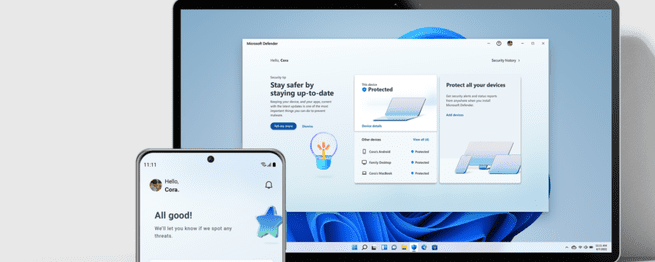
Microsoft Defender is a different product from Windows Security, which is built into every Windows PC by default. The latter includes Microsoft Defender Antivirus, which detects and removes malware. The stand-alone Microsoft Defender is available only with a 365 subscription. In addition to malware protection, this tool includes ‘Web security, real-time security notifications and security tips., writes Microsoft. In addition, unlike Windows security, it is also usable on smartphones and Macs. It also includes an exclusive feature which monitors online identity fraud, although for now it is only available to 365 subscribers in the US. It is expected to come to Europe but could take up to a year.

At Analyst ICT we use Sophos security solutions, we do not see Microsoft Defender as a replacement for most of our customers. If you have any questions about this please contact contact with us.

Source: Tweakers

Recent blogs

apple header
Blog
Apple 50 Years: 50 Years of Daring to Think Differently
This year, Apple celebrates its 50th anniversary. A milestone that cannot simply be overlooked. Because whether you are a fan or not: Apple has permanently changed the way we work, communicate, and create. At Analyst ICT, we are proud to be part of this ecosystem. As an Apple Technical Partner, we work daily with technology that is not only powerful but, above all, logical and pleasant to use. A different perspective on technology Apple has always distinguished itself by one simple conviction: technology should help people, not hinder them. No unnecessary complexity, but simplicity and ease of use. That aligns seamlessly...
browser password
Blog
Why saving passwords in your browser is not a good idea
The blog post below was created in response to a question during our engineering meeting. Every two weeks, we get together with all of our technical staff to discuss the latest developments in technology or with clients. Good client questions also arise during these meetings, such as this one. Time to do some research. Thank you, Wiebe! You've probably experienced this: you log in to a website, and your browser asks if it should remember your password. Convenient, fast, and you don't have to remember anything. However, there's a risk involved. In practice, we see that many security incidents start with something small. Like saving passwords…
Apple Business
Blog
Apple is taking a big step with Apple Business
Apple announced something special this week. Not a new device, but something that might be even more interesting for many organizations: Apple Business. A completely new platform with which Apple brings all its business services together in one environment. And frankly: this is a development that we at Analyst ICT are following with great interest. The problem: fragmented tools and unnecessary complexity Many organizations working with Apple will recognize the problem: Multiple portals (Apple Business Manager, Business Essentials, Connect) Different tools for management, branding, and support Additional costs for basic functionalities such as device management This leads to a lack of clarity and costs time. And…

A newsletter

Superlogic right?