Setting up Office 365 mail on IOS

It's been vacations, mail off the phone for many and now time to put it back. This guide describes how to add your Office 365 email account to your iPhone or Ipad.

CAUTION! Before beginning this instruction, test if it is possible to log in to https://portal.office.com 

Even if you want to log in from abroad or if you do not have access to your mobile, you can use the link above.

Supplies

  • An iPhone
  • Office 365 account
  • Your email address
  • Your password

Step 1: Go to settings

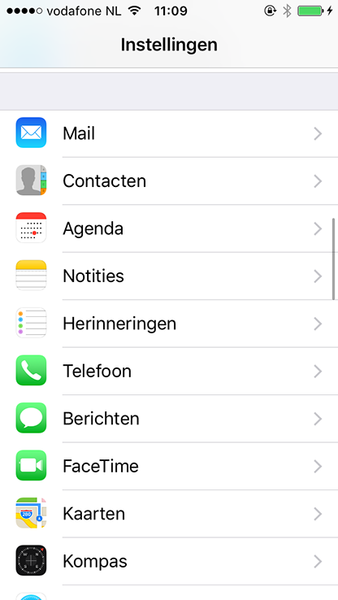
  • On your iPhone, from the main menu, choose ‘Settings’

Step 2: Go to email settings

  • Select ‘Accounts and passwords’

Step 3: Choose ‘Add account...

  • Choose ‘New account...’

Step 4: Exchange

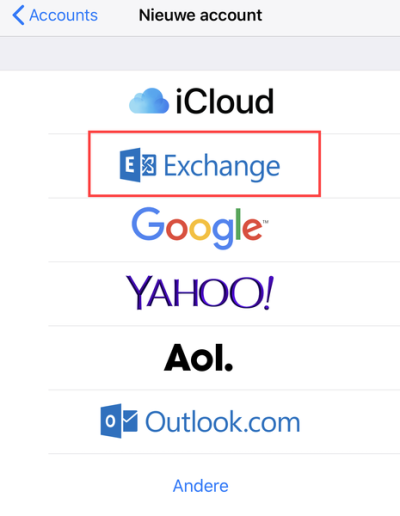
  • Choose ‘Exchange.’

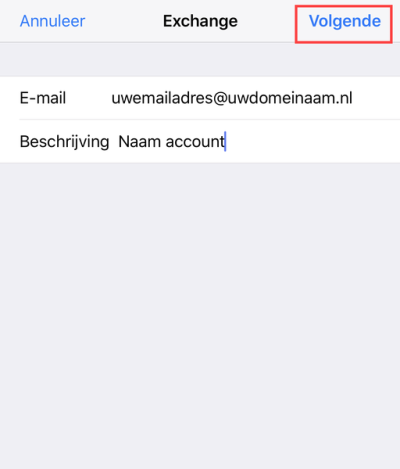
Step 5: Enter your account information

Then you need to enter the information below using your own data:

  • Email: Your Email Address
  • Description: mailbox name

After entering these details, click ‘Next’
Step 6: Login

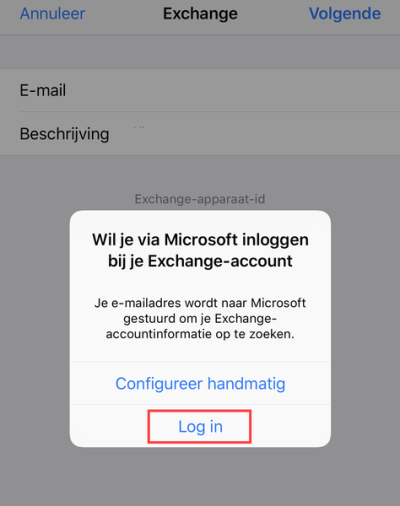
You will be asked in the next step whether you want to manually configure your mailbox or log in. Choose ‘Log in’
Step 7: Office 365 account

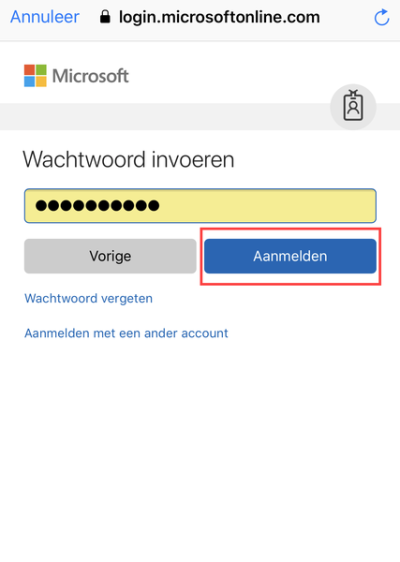
Enter your password and choose ‘Sign in’
Step 8: Finish

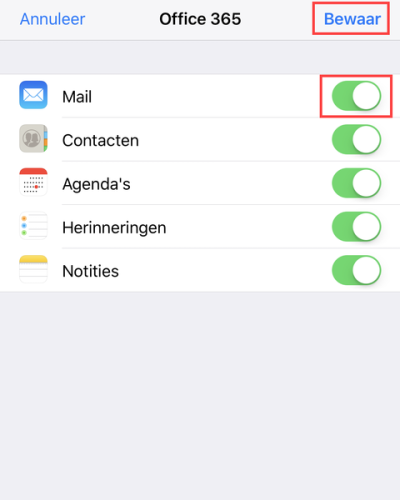
You will then be asked which options you want to use for synchronization. In any case, make sure you have ‘Mail’ enabled at all times. Click ‘Save’ to complete the mailbox addition.
If you can't figure it out or still have questions email support@analystict.nl or contact us at: 040-2070007.


Recent blogs

kwantumcomputers
Blog
What are quantum computers? And why is everyone suddenly talking about them?
Chances are you've been hearing more and more about quantum computers in recent months. In the news, on LinkedIn, or perhaps even during conversations about AI and cybersecurity. Especially now that a Dutch chip developer is gaining global attention with a new generation of quantum chips, the technology suddenly seems closer than ever. But what exactly is a quantum computer? And why is so much expected of it? From Ordinary Computer to Quantum Computer To understand quantum computers, it's helpful to first look at how a normal computer works. A traditional computer — like your laptop or server — works with bits. A…
frankberry
Blog
With our feet in the mud
Here we are. Not quite recognizable anymore, thanks to AI trying to protect children. Understandable, of course. But believe us: these really are Berry and Frank. More than ten years apart, but in reality, we've always been brothers from another mother. And what do we have in common? A lot... and at the same time, almost nothing. Berry is often the good cop. Calm, down-to-earth, and always working to get things done. I'm usually the bad cop. Direct, critical, and always looking for ways to improve. But that combination is precisely what works. What completely unites us, though, is our love for...
Macadmins Leiden
Blog
MacAdmins Meeting: What's relevant for your organization?
Last week, we attended the MacAdmins Meeting in Leiden. It's a gathering focused on Apple administration, security, and innovation. What stood out? Developments are moving fast. But more importantly: they are becoming increasingly relevant for SMEs. We'd like to share the key insights with you. What's happening? And what does that mean for your organization? Running AI Locally: Control Over Data and Costs AI is now everywhere. But one question remains central: where does your data reside? A significant topic during the meeting was running AI models (LLMs) locally. Instead of relying on external cloud platforms, more and more...

A newsletter

Superlogic right?